
News
How to Create Trustworthy Product Images That Help Shoppers Buy With Confidence

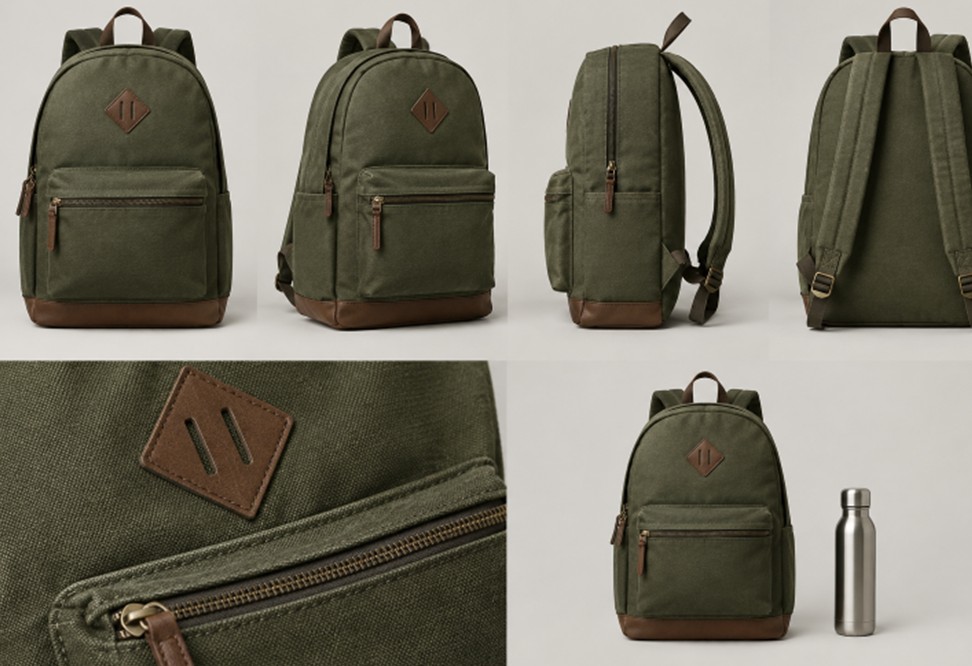
Product images do more than make a listing look polished. They answer practical questions that product copy cannot always resolve, including what an item looks like, how it is used, and whether it fits a shopper’s expectations. Tools such as an AI background generator can speed up production, but the finished image still needs to accurately represent the actual item.
The strongest image strategy balances visual appeal with product accuracy. A beautiful scene may earn attention, but clear views, realistic colors, and useful details are what help customers decide whether the product is right for them.
Key Takeaways
- Plan images around the questions a buyer needs answered before checkout.
- Use a mix of clean product views, detail shots, scale references, and realistic lifestyle scenes.
- Edit for clarity, but never change the item’s true size, shape, color, components, or capabilities.
- Review AI-assisted images closely for incorrect labels, proportions, textures, and product features.
- Check every image on a mobile screen before publishing it.
- Use performance data, customer questions, and return reasons to improve future images.
Why Product Images Carry So Much Weight
Many shoppers form an initial impression from the image before they study a title, description, or specification list. Images can make a catalog easier to scan, help customers compare similar options, and provide fast reassurance about quality. However, attention alone is not the goal. A photo that makes an item appear larger, more premium, or more capable than it really is can create disappointment after delivery.
Think of every image as both a sales asset and a proof point. Styled photography can create interest, while clear catalog photography gives customers the evidence they need to make an informed choice.
Start With the Buyer’s Main Questions
Before setting up a camera or opening an editing tool, list the questions that could stop someone from buying. For many products, shoppers want to know:
- What does it look like from the front, side, back, top, or underside?
- How large is it in a familiar setting?
- What materials, textures, controls, closures, or finishes matter?
- How does it look when it is being used?
- Which details could otherwise cause confusion or returns?
This approach keeps image planning focused on customer understanding rather than on visual trends alone.
Build an Image Set With a Purpose
A strong product page usually needs more than one attractive photo. Give each image a clear job so buyers can move from first impression to confident decision.
- Primary image: Show the full product clearly with minimal distraction.
- Detail image: Reveal material, stitching, controls, texture, finish, or craftsmanship.
- Angle image: Show views that explain depth, shape, ports, compartments, or construction.
- Scale image: Place the item beside a familiar reference or show it in realistic use.
- Lifestyle image: Add context and mood without hiding the product.
- Variant image: Make meaningful differences between colors, sizes, bundles, or models easy to see.
Keep Edited Images Honest
Editing is useful when it improves clarity. Cropping, dust removal, exposure correction, color balancing, and background cleanup can make an image easier to inspect. More caution is needed when changing shadows, adding reflections, replacing the environment, or combining several images into a single scene.
Avoid edits that alter the product itself. Do not change its dimensions, material, color, included accessories, packaging, labels, controls, or performance. This standard matters even more with generated visuals. An AI-commerce incident involving misleading product images illustrates how major differences between advertised visuals and delivered goods can lead to complaints, refund requests, and disputes.
Use AI-Assisted Editing Without Losing Product Fidelity
AI-assisted tools can be valuable production support. They can help create background variations, resize an approved photo for social formats, remove small distractions, or test scene concepts before a larger shoot. They should not be treated as a substitute for checking the real product.
Review every final image at full size. Look closely at logos, words, buttons, seams, handles, labels, edges, reflections, and proportions. If a generated result invents a pocket, changes a pattern, removes a control, or distorts the product, discard it or correct it before publication.
Make the Setting Support the Product
A background should explain likely use without becoming the main subject. A desk accessory can sit on a believable work surface, outdoor gear can appear in an appropriate outdoor environment, and kitchen equipment can be shown near the counter where it would normally be used. Keep the product large enough to inspect, use lighting that suits its material, and leave space for future campaign text when needed.
Props require care. Do not include objects that imply an accessory is included, suggest an unsupported use, or make the item appear much larger or smaller than it is.
Design for Small Screens First
An image that works on a large monitor may fail as a phone thumbnail. Use simple compositions, keep the product prominent, and place critical details away from the edges where platform cropping may remove them. Test square, vertical, and landscape versions for sales channels that use different formats.
Image accessibility matters, too. Useful product images need concise text alternatives that communicate the information the image adds, while purely decorative images can use empty alternative text. The guidance on text alternatives for images explains how an image’s purpose should shape its alt text.
Create a Consistent Visual System
Consistency makes a catalog easier to browse and compare. Set repeatable rules for lighting, background treatment, product scale in the frame, camera angles, spacing, and color treatment. Document those choices in a short internal image guide so freelancers, teammates, and future shoots follow the same standard.
Test Images With Useful Measures
Personal preference is not enough to judge performance. Compare click-through rates on category and search pages, add-to-cart activity, common product questions, and return reasons related to appearance, color, or size. Review mobile and desktop behavior separately when possible.
The winning image is not always the brightest or most dramatic one. It is the image that earns attention while making the real product easier to understand.
A Simple Pre-Publishing Quality Check
- Does the image show the exact item being sold?
- Are its color and finish close to reality?
- Are visible labels, logos, and words correct?
- Do the dimensions and proportions look believable?
- Does the setting imply a use the product cannot support?
- Is the product clear on a small phone screen?
- Does the image add information rather than repeat what’s already shown?
- Does the file load efficiently without obscuring fine details?
Conclusion
Trustworthy product imagery informs before it persuades. Combine a clear primary image, meaningful detail views, realistic scale references, and carefully chosen lifestyle scenes. With thoughtful editing, human review, and a steady focus on buyer questions, product images can strengthen both customer confidence and the quality of the shopping experience.


Top SEO Agencies for Automotive Brands in Australia

Hurt at Work? A Second Claim Might Cover Pain Comp Ignores

How to Create Trustworthy Product Images That Help Shoppers Buy With Confidence

Game Music and Sound Design: How Audio Shapes Online Play

Biggest CFD Brokers in the World: Who Leads the Global Market?

Your First Gum Measurements: Making Sense Of The Numbers

Biltema Tools, Car and Garden Products: A Practical Owner’s Guide to Using Product Manuals

A Look at the UK’s Online Gaming Landscape

Mexico City museums, parks and food markets: a culture-first itinerary

How an Edit Stays Useful After the Face Paste Stops Impressing Anyone

ADA Signage: What Every Business Should Know About Interior Signs

Understanding Single-Account Gaming Platforms and Their Benefits

Cove Lighting and False Ceilings: Creating a Soft, Layered Glow

Where to Find Pennsylvania’s Best Pizza During National Pizza Month

Corporate Gifts for Better Business Brand Promotion Now

Inside the Multi-Million Dollar Gaming Economy: How Streamers and Digital Assets Drive the Virtual Currency Boom


Don Toliver Net Worth: Height, Age, Real Name, Career & More
Don Toliver is an American rapper and singer best known for his RIAA platinum certified songs, No Idea and After...


Finesse2tymes Net Worth: Height, Age, Real Name & Career
Finesse2tymes is an American rapper and recording artist. He is mainly recognized for his thunderous voice and motivational lyrics in...


Sugarhill Ddot Net Worth: Height, Age, Real Name & Career
Sugarhill Ddot is an American hip-hop recording artist best known for his songs, Real Facts and I Wanna Love You....


GloRilla Net Worth: Height, Age, Bio, Real Name & Career
GloRilla is an American rapper and hip-hop recording artist from Memphis. She is best known for her popular singles, “Westside...


Destroy Lonely Net Worth: Height, Age, Real Name & Career
Destroy Lonely is an American rapper best known for his 2022 mixtape, No Stylist. He is currently signed to rapper...
-
Rappers2 years ago
GloRilla Net Worth: Height, Age, Bio, Real Name & Career
-

 News2 years ago
Trash To Treasure: Maximizing Space And Efficiency Through Junk Removal
-

 Businessman3 years ago
7 Proven Lead Generation Strategies To Implement in 2023
-
 Businessman2 years ago
Brandon Fugal Net Worth: How Rich is Skinwalker Ranch Owner?
-

 Rappers4 years ago
BigXthaPlug Net Worth: Height, Age, Real Name & Career
-

 TV Stars2 years ago
Kaleb Cooper Net Worth: How Rich is the TV Star Actually?
-

 Internet Stars4 years ago
Mufti Menk Net Worth: How Rich is the Islamic Speaker Actually?
-

 TV Stars2 years ago
Carla Diab Net Worth: How Rich is the TV Star Actually in 2025?
You must be logged in to post a comment Login